

Houston offices rarely struggle with Wi-Fi because people “need more bars.” They struggle because workspaces are busy, layered, and always changing. Video calls run next to cloud apps, guest traffic, printers, access control, and devices people forget to mention until they are already installed. When coverage feels uneven, the real cost is time: dropped meetings, slow uploads, and constant workarounds that quietly frustrate teams.
A strong office Wi-Fi upgrade is not just adding access points and hoping for the best. It is a planned approach that matches the space, the crowd patterns, and the traffic that spikes at predictable times. When the build is thoughtful, coverage improves in the problem zones first, and support requests drop instead of shifting to a new corner of the floor.
Wi-Fi Installer Surveys That Replace Guesswork with Evidence
A clean survey is where experienced Wi-Fi installation companies earn trust early. Their team typically maps existing signals, identifies interference sources, and checks the spaces that fail first: conference rooms, hallways, kitchen areas, and deep interior suites. They also review ceilings, mounting options, and cabling paths so the final plan is realistic, not theoretical. This prevents a “design looks great, install is impossible” surprise two weeks into the job.
Read More : Powerful CMS for Media Companies: Optimize News Delivery
Surveys should also include the business context. How many staff are on-site at peak, what guest traffic looks like, and which apps are business-critical all change the design. If the office runs constant video meetings, for example, uplink stability matters more than a basic speed test. When survey findings are documented clearly, stakeholders can compare proposals fairly and understand what is included before committing budget.
Coverage Gaps Usually Follow Crowd Patterns
When the office is at peak occupancy, it generates “micro hot spots” that resemble small stadiums. Elevator lobbies, conference corridors, break areas, shared print zones – of a sudden, all at once. From the network’s perspective, they correspond to tiny, fiercely contested slices of airspace. If coverage design does not anticipate those ups and downs, everyone recognizes the pattern. The signal is strong in the “quiet” spaces, but as soon as more individuals arrive, the network gets slow and unpredictable. That is why user movement is as critical as room design.
Materials and layout amplify the problem. Glass partitions, dense cores, and odd hallway bends change how RF travels, so a perfect-looking layout in one suite may fail in the next. The most practical starting point is logging where complaints happen, when they happen, and what people are doing when performance drops. Once traffic behavior is clear, the fix becomes more targeted and less expensive.
Commercial Wi-Fi Layout Planning for Consistent Office Coverage
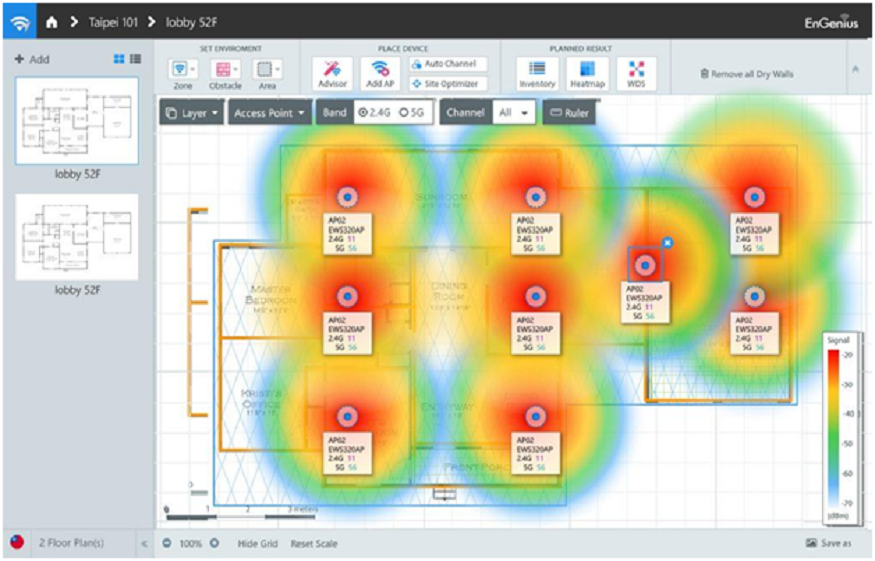
A good layout is not “more access points.” It is placing the right access points in the right zones, with spacing and orientation that match how people use the office. Structured commercial Wi-Fi installation planning typically accounts for density in meeting clusters, corridor transitions, and open areas that host large teams. When placement follows usage, coverage feels smoother as people move, rather than dropping every time they step into a hallway or lobby.
Channel planning and power settings matter just as much. Overlapping channels, aggressive power levels, and poorly balanced radios can create self-inflicted interference that looks like “bad Wi-Fi.” A structured plan uses measured targets, not guesses, and avoids crowding too many devices onto the same resources. When the layout is intentional, performance improves in the busiest areas first, which is where teams notice the difference immediately.
Cabling, Switching, and PoE Readiness behind the Scenes
Office Wi-Fi performance depends on the wired layer more than most people realize. If PoE budgets are tight, uplinks are undersized, or switching is misconfigured, coverage can look fine while performance still collapses under load. Teams should confirm cable quality, closet condition, and backhaul capacity before installing new wireless gear. A stable backbone turns Wi-Fi from “sometimes good” into a predictable day-to-day service.
This is also where Wi-Fi installation companies help offices avoid expensive rework. Their team can identify crowded conduits, aging cable runs, and closet layouts that will slow the project if they are ignored. They also coordinate labeling and documentation so future troubleshooting is faster and less disruptive. When the cable layer is clean and verified, the wireless layer performs more consistently, and upgrades stop feeling like repeated guesses.
Validation and Tuning That Proves the Upgrade Worked
Testing should be built into the plan, not treated as an optional step at the end. A smart approach validates performance in the real problem zones: meeting clusters, busy corridors, and high-density floors during typical business hours. That includes confirming roaming behavior, verifying uplink stability, and checking that guest traffic does not starve internal users. When results are documented, teams can prove improvement instead of relying on “it feels better.”
A well-run structured commercial Wi-Fi installation also leaves a baseline the office can reuse. If a tenant remodel changes the layout, teams can retest the same points and compare results, rather than starting from scratch. This is how upgrades stay stable over time. It also reduces back-and-forth with stakeholders because performance is shown in measurable terms, not explained with vague language.
Ongoing Checks That Keep Coverage Strong as Teams Grow
Wi-Fi reliability drifts when offices change. A new set of glass offices, a bigger team on one floor, or a moved conference wall can shift performance even if no one touched the access points. The simplest protection is a light check cadence: confirm key zones, review logs for recurring issues, and test after major workspace changes. Small checks prevent small drift from becoming a full rebuild later.
A practical operations playbook also keeps service calm. It defines who owns change requests, how guest access is managed, and what happens when a floor adds devices quickly. When upgrades are planned with serviceability in mind, support teams avoid emergency troubleshooting during business hours. The office stays productive, and tenants or departments stop feeling like Wi-Fi is a recurring problem that never really gets solved.
Conclusion
Coverage across busy Houston workspaces improves when Wi-Fi is treated like infrastructure: surveyed, planned, installed cleanly, and verified with repeatable testing. The best outcomes come from matching design to real crowd patterns, validating the wired layer, and tuning performance where people actually work and move. When those steps are handled with discipline, complaints drop, meetings stabilize, and the network becomes easier to support as the office evolves.
CMC communications can help Houston offices plan and deliver upgrades that improve coverage in high-traffic zones while keeping disruption low in occupied spaces. Their team supports structured surveys, practical installation coordination, and clear closeout documentation that remains useful after remodels and growth, so performance stays consistent instead of drifting back into old problem patterns.
Frequently Asked Questions
Question: Why does Wi-Fi fail more in conference corridors and elevator lobbies?
Answer: Those areas concentrate people and devices at the same time, so airtime gets crowded. Even with a decent signal, performance can lag when too many users compete. Better placement and channel planning usually solve it faster than simply adding power.
Question: Do more access points always improve coverage?
Answer: Not always. Too many access points can increase interference and make roaming worse. A better plan balances placement, channel use, and power levels based on real traffic hotspots.
Question: How can an office reduce disruption during an upgrade?
Answer: Phasing work by zone, batching noisy tasks after hours, and keeping daytime work focused on quiet closet tasks helps. Clear notices and same-day ceiling restoration also keep cooperation high in occupied offices.
Question: What should teams verify before upgrading Wi-Fi hardware?
Answer: They should confirm cabling quality, PoE budgets, switching capacity, and closet conditions. Many “Wi-Fi” problems are actually wired bottlenecks that show up under load.
Question: What should a closeout package include?
Answer: A good package includes updated floor plans, access point locations, basic configuration notes, and baseline test results in key zones. Keeping records organized makes future changes and troubleshooting much faster.
Read More : Data Analytics for Business Sales and Profit Tracking in Mumbai
Question: How often should offices recheck coverage after an upgrade?
Answer: Light checks after major layout changes are smart, plus a periodic review of logs and key zones. Consistency matters more than frequency, because trends reveal drift early and keep fixes small.